


For anyone navigating the expansive digital design world, the terms “wireframes”, “mockups” and “prototypes” can easily seem like a confusing blur of words. Without a clear understanding of the different meanings and applications of each, it can be difficult to know where and when to use them. Keeping track of the differences between a wireframe, mockup, and prototype can be overwhelming, especially for those just starting out in the realm of user interface design. Even with some design experience, it can be hard to keep their functions straight.
To help untangle this confusion, this comprehensive guide will outline the features, benefits, and applications of each. It will be your ultimate source for information on distinguishing wireframes, mockups, and prototypes. Whether you’re a seasoned design professional or a newcomer to the game, this guide provides all the necessary resources you need to make sure you’re using the right tool for the job.
Introduction to Wireframe, Mockup, and Prototypes
Welcome to your comprehensive guide to understanding the differences between wireframe, mockup, and prototype! The terms can often be used interchangeably, but each of these processes is essential for creating the basis for a successful digital product. To facilitate the design process and ensure that your product is top-notch, it’s important to be well-versed in the distinctions between wireframe, mockup, and prototype.
Here, we’ll provide a comprehensive overview of each type of design, including when they are best used and how they contribute to the overall design process. Read on to learn more about how to distinguish wireframe, mockup, and prototyping—and why they’re all necessary components of any successful design project.
What is a Wireframe?
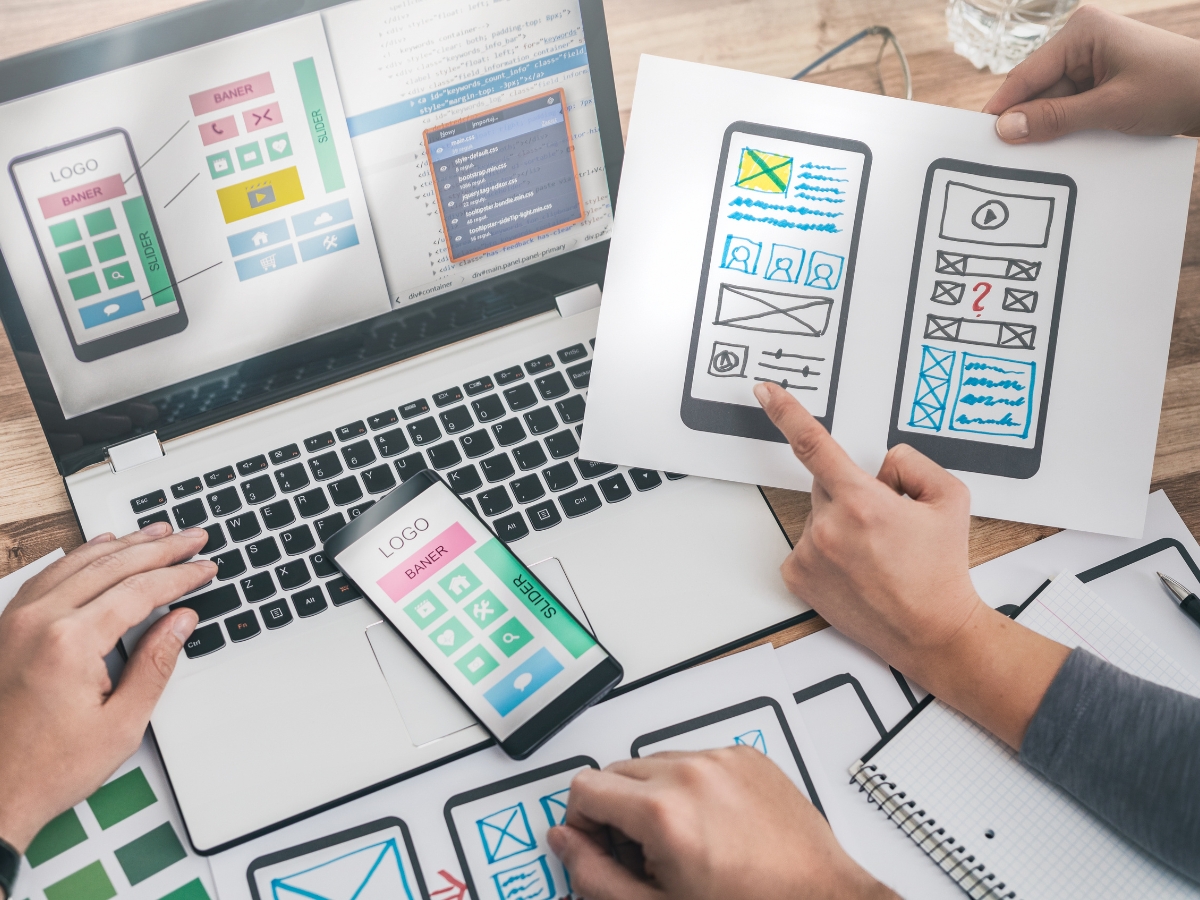
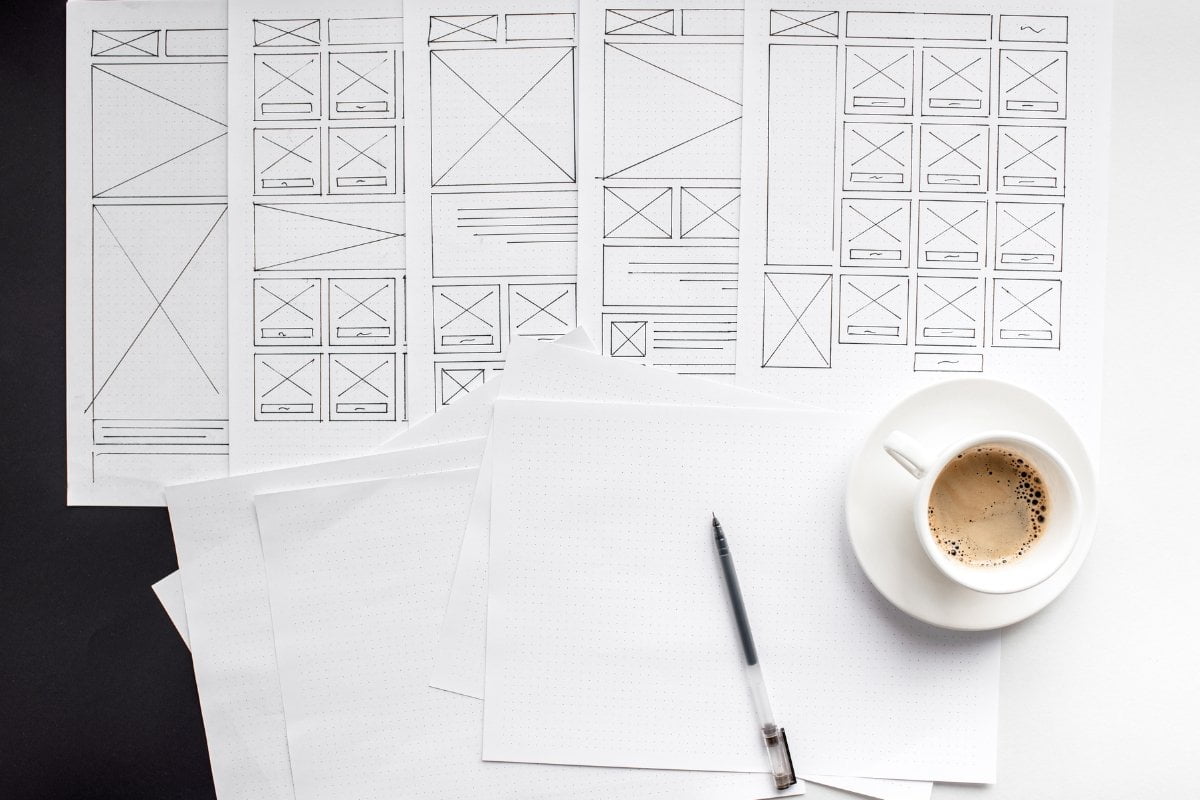
A wireframe is a low-fidelity diagram that acts as the skeletal framework of a product, often created during the early stages of the design process to present a pictorial representation of a product’s content, structure and functionality. As the most basic tool for visualizing user interfaces, wireframes are the foundation of any successful design project. They are often used to help designers quickly identify any potential issues and explore ideas before making a commitment to more detailed designs.
Wireframes are blueprints for websites, mobile apps or any other type of digital product, providing a quick and comprehensive visual representation of the product’s user interface. By using wireframes, designers can communicate their ideas to developers, stakeholders and key decision makers in an easily-digestible way.
Understanding Mockups: Explained
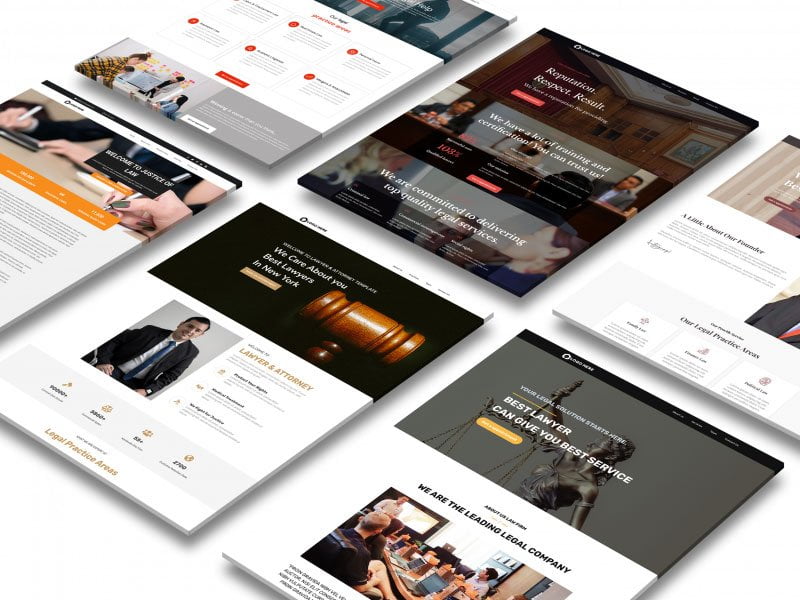
A mockup is a static, high-fidelity visualization of a product allowing for a realistic representation of the product that bridges the gap between the wireframe and prototype phases of product design. A mockup is a visual prototype that closely models the functionality and structure of the final product. It’s a realistic representation of an interface to be used by both developers and end-users. As such, it can be used to quickly validate ideas and concepts with stakeholders, identify possible design flaws, and help in the overall web design process.
The main purpose of a mockup is to communicate the look and feel of the product, while being detailed enough to provide an accurate representation of the product’s user experience. By providing an interactive model that can be explored and manipulated, mockups can easily help identify issues before they reach the development stage.
What is a Prototype?
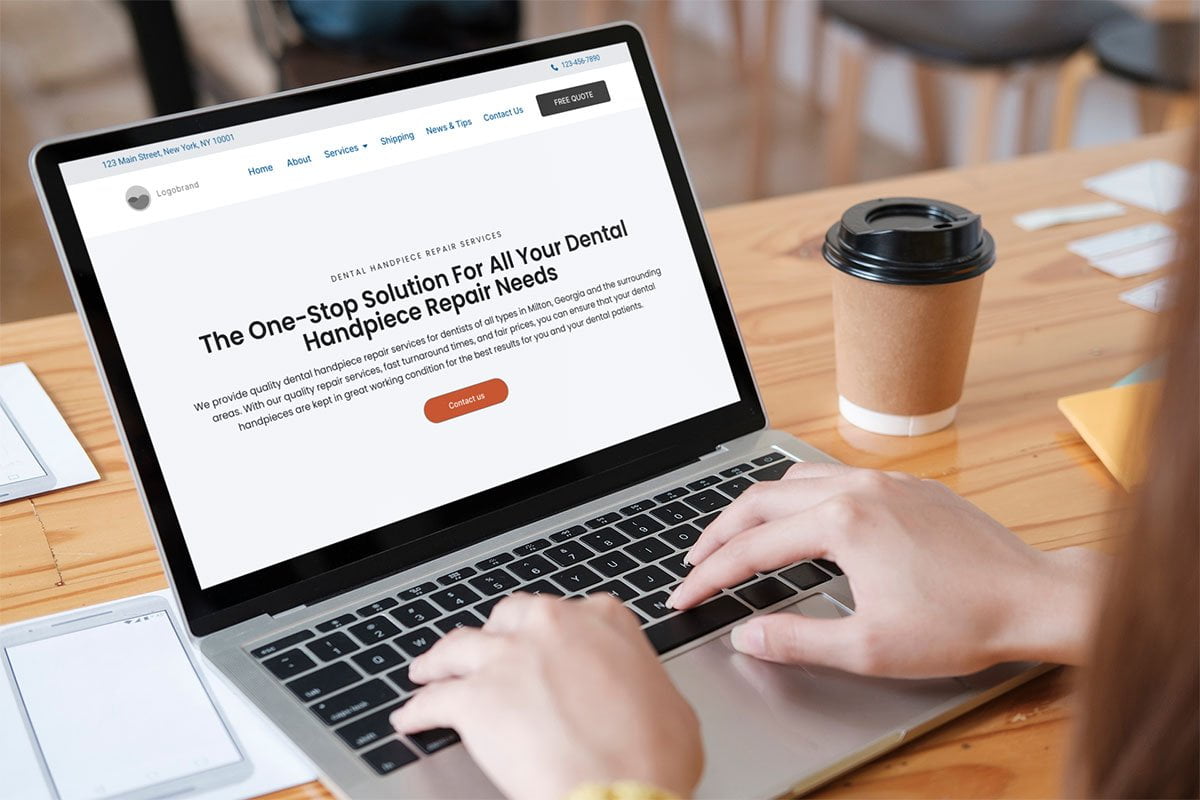
In web development, a prototype is a working model of an interface, app, website, or system that is used for testing and evaluation. Prototypes allow developers to quickly and easily test out ideas and make sure they are visually appealing, user-friendly, and well-functioning before investing in more costly and time-consuming development efforts.
Unlike wireframes and mockups, prototypes are interactive and usable, meaning that they allow users to interact with it by clicking and scrolling just like they would with the finished product. Prototypes also provide a better understanding of the user experience, as it allows designers to see how users will actually interact with the product. They can also be used to evaluate usability and make improvements before the final product is ready to be released.
In short, prototypes are essential for developing effective and user-friendly products. They provide the necessary tools and insights to create high quality products and user experiences in the most efficient and cost-effective way possible.
Unearthing the Benefits of Wireframe, Mockup, and Prototype
Are you a product or web designer who finds it difficult to distinguish wireframe vs mockup vs prototype? If so, you’ve come to the right place!
Wireframes allow creators to work out the anatomy of the product and layout all the essential elements without being concerned about the design style or aesthetic. Mockups are based on wireframes but with the addition of dynamic details like textures, color schemes, fonts, and more. Prototypes are used to represent the end goal with the aim of giving users an interactive experience to test the actual product.
All these tools provide valuable aid during the development process, but each has their own specific advantages that come in handy depending on the project. Wireframes are useful for testing the functional parts of the design, mockups enhance the overall look, and prototypes provide an understanding of how the product will actually work. Ultimately, the decision of which one to choose is entirely dependent on the purpose of your project.
So, when it comes to wireframe vs mockup vs prototype, the key is to understand the advantages each option offers and use them to your advantage. With the right combination of tools, you can take your design to the next level.
How to Choose the Right Tool: Wireframe vs Mockup vs Prototype
When it comes to creating high-quality websites, the nuances between wireframes, mockups and prototypes are often hard to distinguish. The truth is, understanding the difference between these three tools is essential if you want your website to be both functional and visually appealing. To help, here at Newman Web Solutions Agency, we break them down into the following categories:
A wireframe is a basic outline of a page or user interface. It allows for designers to quickly layout the structure of a website or app before diving in and creating a design. Wireframes do not include styling or graphics, so it’s easy to make changes around structure and flow. Having a wireframe also helps ensure that developers have a clear visual map to follow when coding.
A mockup is much more than a wireframe. It allows designers to create a realistic representation of the final product, generally with some limited interactivity. Before building out the full website or mobile app, the mockup can easily be shared with stakeholders to see how the final product will look and feel. It’s also a great tool to get client feedback and approval before beginning the development process.
A prototype is an interactive model of the final product. It allows developers to test the functionality of a website or app without having to build the entire thing. Prototypes can range from low fidelity to high fidelity, and usually include all the elements of the live site, but with limited interactivity.
Conclusion
At Newman Web Solutions, we’ve established a streamlined process for our wireframes, mockups, and prototypes. We create our wireframes right on the WordPress staging site, and then transition that into a live design prototype. Our clients love being a part of the process and having a hands-on approach to their website. They’re able to see the design iterations evolve in real-time and make customizations as needed. We think this is the best way to deliver a website that is tailored to their needs.
For those looking to update their website design or build a new website, we invite you to contact us for a free in-depth strategy session. We look forward to discussing how we can bring your vision to life!
Lori Newman
Hello, cyber explorers! I'm Lori Newman, the proud Creative Director and co-founder of Newman Web Solutions, where we don't just build websites; we craft digital experiences that captivate, convert, and conquer! Based in the bustling tech hub of Atlanta, I've spent over a decade in the digital realm, turning pixels into Picasso-esque masterpieces and code into poetry.
Atlanta isn't just the birthplace of Coca-Cola; it's also a burgeoning tech town teeming with potential. At Newman Web Solutions, we're committed to making Atlanta a hotspot for groundbreaking web design and innovative digital strategies.
design, tool, high fidelity, feedback, workflow, mockup, brainstorming, web design, mobile app, user experience design, website wireframe, usability testing, usability, target audience, experience, image, ideation, prototype, icon, concept, software, information, credit card, web development, blueprint, paper, user interface, market, interactivity, drag and drop, typography, curve, simulation, architecture, trello, communication, navigation, flowchart, diagram, learning curve, sketch, whiteboard, ios, font, color, customer experience, figma, technology roadmap, iteration, app, roadmap, apps, development, website prototyping tools, stakeholder, information architecture, animation, pen, user, symbol, balsamiq, illustrator, document, knowledge base, outline, research, menu, collaboration, android, structure, jira, dashboard, web page, atlassian, macos, terms of service, justinmind, understanding, workspace, analytics, brand, lucidchart, microsoft teams, hierarchy, learning, mac, mind map, complexity, graphics, customer, kanban, aesthetics, engineer, budget, digital marketing, data, gantt chart, logo, organization, attention, mind, landing page, knowledge, language, pixel, website, faq, drawing, website mockup tool, balsamiq mockups, ui mockup tools, app mockup tool, free mockup tools, free website mockup tool, wireframe website free, web mockup tool, balsamiq download, page layout, user interface design, mobile app development, software development, artificial intelligence, web application, release, application design, engine, audit, technology, level of detail, lorem ipsum, end user, interaction design, software engineering, minimum viable product, user research, client, table of contents, grayscale, look and feel, virtual reality, api, software development process, innovation, business, wireframe vs prototype, prototype and wireframe, wireframe vs mockup, user feedback, behavior, user story, iterative design, teamwork, risk, pricing, newsletter, chief executive officer, refining, reality
Frequently Asked Questions
What is the difference between wireframe and mockup?
A wireframe is a basic visual layout of a webpage or app, focusing on structure and functionality, without design elements. In contrast, a mockup is a more detailed representation including design components like colors and typography, providing a clearer and more realistic preview of the final product.
What is the main difference between wireframe and mockup designs?
Wireframes focus on structure and layout, showcasing the skeletal framework of a design. Mockups, on the other hand, offer a more detailed visual representation, incorporating colors, fonts, and design elements to provide a closer representation of the final product.
What is the difference between a wireframe and prototype?
A wireframe is a static, basic visual representation of a design's structure and layout, focusing on wireframe's skeletal framework. A prototype is an interactive representation that simulates the final product's functionality and user experience.
What is the importance of wireframe mockup in UX design?
Wireframe mockups are crucial in UX design as they provide a visual blueprint of the user interface, allowing for early feedback, easy iteration, and alignment among stakeholders. Wireframes focus on structure and functionality, aiding in creating intuitive user experiences and saving time in the design process.
Can a wireframe mockup be used for accessibility testing?
Wireframe mockups can serve as a valuable tool for early-stage accessibility testing. They allow designers to focus on structural elements like layout and navigation, aiding in identifying potential issues. However, to fully assess accessibility, interactive prototypes or code-based evaluations are recommended for a comprehensive evaluation.
Can a prototype be used for usability testing?
Yes, a prototype can be used for usability testing. Prototypes are valuable tools in evaluating user interactions, gathering feedback early in the design process, identifying usability issues, and refining the final product. They help in simulating the user experience and iteratively improving the design based on testing results.
What is the purpose of creating a low-fidelity wireframe?
Creating a low-fidelity wireframe serves to quickly visualize and iterate on the layout and functionality of a design concept. It helps in gathering feedback early in the design process, focusing on structure rather than aesthetics, and saving time and resources by easily making changes.
Is a mockup a high-fidelity design approach?
A mockup typically represents a low-fidelity design approach, focusing on basic layout and structure without intricate details like colors or typography. In contrast, high-fidelity designs include precise elements such as realistic images, interactive features, and accurate content placement, offering a more refined representation of the final product.
What is the relationship between wireframe mockup and prototype?
A wireframe mockup is a basic visual representation of a design's structure, focusing on layout and functionality, while a prototype is an interactive simulation showcasing design's functionality and user interactions in more detail based on the wireframe. Think of wireframes as blueprints and prototypes as a functional model.
Can a wireframe be used as a mockup?
Yes, a wireframe can be used as a preliminary mockup to outline the visual and structural elements of a design. Wireframes focus on layout and functionality, while mockups add visual styling for a more realistic representation of the final product.
What is the primary goal of a design mockup?
The primary goal of a design mockup is to visually represent the layout, design elements, and functionalities of a digital product before the actual development phase. It serves as a prototype for stakeholders to review, provide feedback, and make necessary revisions efficiently.
Can a mockup be used for marketing materials?
Yes, a mockup can be used effectively for marketing materials as it provides a visual representation of the final product, helps in showcasing design concepts, and allows for feedback and revisions before production. This can enhance the overall presentation and impact of marketing materials.
Can a wireframe be used for design iteration?
Yes, wireframes are excellent for design iteration as they allow quick visualization and feedback gathering. They help refine layout, functionality, and user flow efficiently during the design process, promoting collaboration and identifying any potential issues early on.
When to use a mockup in the design process?
Mockups are essential in the design process for visualizing layouts, gathering feedback, and testing designs' usability early on. They help in stakeholder communication, refining ideas, and ensuring the final product meets user needs. Utilize mockups during initial design phases and iterative revisions for an effective design workflow.
What are the benefits of creating a mockup first?
Creating a mockup first provides visual clarity, improves communication with stakeholders, saves time by identifying design flaws early on, allows for easy revisions, and serves as a blueprint for the final product's development. This essential step ensures better alignment and reduces costly rework during the design process.
What tools are used to make a wireframe mockup?
Wireframe mockups can be created using various tools, such as Adobe XD, Sketch, Figma, Balsamiq, and InVision. These tools offer features for designing the layout and structure of websites or apps before moving into the development phase.
What tools are used to create a digital mockup?
To create a digital mockup, tools like Adobe XD, Sketch, Figma, and InVision are commonly used. These software applications offer features for designing user interfaces, prototyping, and collaborating on digital design projects effectively. Adobe Creative Suite and online platforms like Canva can also be handy for creating mockups quickly and efficiently.
What is the purpose of a wireframe mockup in design?
Wireframe mockups serve to outline the structure and layout of a design's interface, focusing on functionality and user experience before detailed design elements are added. They help visualize content placement, hierarchy, and interactions, aiding in early design evaluation and iteration.
Can a wireframe mockup be interactive?
Yes, a wireframe mockup can be made interactive through the use of clickable elements, buttons, and hotspots. By incorporating these features, users can simulate interactions and better visualize the functionality of the final product during the design phase.
When to use wireframing in the design process?
Wireframing is beneficial in the design process when clarifying layout, structure, and content organization. It aids in early visualization, feedback gathering, and refining user interactions. Initial wireframes can boost overall efficiency and collaboration among stakeholders before diving into detailed design elements.
What are the benefits of using a wireframe mockup?
Using a wireframe mockup offers clarity in design direction, aids in identifying usability issues early on, boosts collaboration among team members, saves time and resources in the long run, and facilitates effective communication between stakeholders throughout the design process.
Is wireframing a low-fidelity design approach?
Wireframing is indeed a low-fidelity design approach. It involves creating basic visual representations of a design concept using simple lines and shapes to focus on layout and functionality rather than detailed aesthetics. Wireframes help in outlining the structure and interaction of a design without getting into high-fidelity details.
How do you iterate between a mockup and a prototype?
When transitioning between a mockup and a prototype, iteratively refine the design based on feedback. Start with low-fidelity mockups to gather initial ideas, progress to interactive prototypes for user testing and validation, and refine gradually, incorporating feedback to enhance the design iteratively.
What is the primary difference between a mockup and a prototype?
A mockup is a static representation of a design, showing the layout and visual elements. In contrast, a prototype is an interactive model that allows users to test functionality and interactions in a simulated environment.
What is the purpose of creating a digital prototype?
Creating a digital prototype allows designers to visualize and test products before production, saving time and costs. It helps in gathering feedback, refining designs, and improving user experience, ensuring a successful final product launch.
What is the role of color in a wireframe?
Color in a wireframe is used sparingly to differentiate between elements and highlight key features, helping to simulate the final design's visual hierarchy and user flow. It adds depth and clarity, guiding stakeholders to focus on structure rather than aesthetics.
What is the role of a prototype in the design cycle?
A prototype plays a vital role in the design cycle as it allows for testing, refining, and validating design concepts before full production. It helps uncover potential issues early, iteratively improves the design, and communicates the vision effectively to stakeholders.
Can a prototype be a functional version of a mockup?
A prototype can be a functional version of a mockup, providing a working model to test usability and functionality. While a mockup focuses on design layout and structure, a prototype aims to demonstrate functionality and interaction. Both serve distinct purposes in the design process.
Is a prototype always an interactive representation?
A prototype is not always interactive; it can be a non-interactive representation. Interactivity can vary based on the project's needs, with some prototypes solely showcasing design or functionality without interactive elements. It depends on the project's goals and the stage of development.
How do I iterate on a wireframe mockup?
When iterating on a wireframe mockup, gather feedback from stakeholders, prioritize changes based on usability, adjust layout and design elements accordingly, refine interactive features, and ensure alignment with project requirements. Regularly test iterations for usability to enhance the user experience and iterate as needed.
Can a wireframe mockup be used for user testing?
Yes, wireframe mockups can be used for user testing to gather early feedback on the visual layout, information hierarchy, and user interactions of a design. They help uncover usability issues at a low fidelity stage, allowing for cost-effective iterations before moving to high-fidelity prototypes.
How do I prioritize elements in a wireframe mockup?
When prioritizing elements in a wireframe mockup, consider the hierarchy of information, user flow, and visual emphasis. Start by defining key actions or content, use contrast to highlight important elements, and maintain a clean layout for clarity. Test the wireframe with users to validate the prioritization.
What is the role of color in a wireframe mockup?
Color in a wireframe mockup serves to differentiate elements, emphasize hierarchy, and provide a visual representation of the final design direction. It can also convey mood and brand identity subtly, aiding in the overall user experience and design communication.
What design elements are included in a wireframe?
A wireframe typically includes basic design elements such as layout, structure, content placement, and functionality placement. It focuses on the overall skeletal framework without detailed design elements like colors, images, or typography. It serves as a visual guide for the layout of a webpage or application.
How do you decide between a mockup and a prototype?
When deciding between a mockup and a prototype, consider the stage of the design process. Use mocks for initial visual representation and prototypes for interactive testing. Mockups focus on aesthetics, while prototypes emphasize functionality and user experience. Choose based on the specific project needs and goals.
How do I test usability with a wireframe mockup?
To test usability with a wireframe mockup, consider conducting user testing sessions, gathering feedback on navigation, interactions, and content clarity. Use tools like InVision or user testing platforms for remote testing. Evaluate user behavior, task completion, and feedback to iterate and improve the wireframe design.
What are the key differences in a mockup and prototype budget?
In a project budget, a mockup focuses on visual representation and design refinement, often less costly. Conversely, a prototype emphasizes functionality and user testing, potentially requiring a higher budget for interactive features and advanced functionalities. The distinction lies in the depth of design and user engagement impact on costs.
How does a prototype influence the final product design?
A prototype influences the final product design by allowing for testing and refining of concepts, identifying potential design flaws early, gaining stakeholder feedback, and providing a visual representation for decision-making. It helps save time and resources in the development process.
How do wireframe mockups evolve into prototypes?
Wireframe mockups evolve into prototypes by adding interactive elements, functionality, and user interactions. The transition involves incorporating design details, refining user flows, and testing usability. Prototypes allow for user testing, feedback integration, and validation of the product's design and functionality before development.
What distinguishes mockups from functional prototypes?
Mockups are static representations used for visual design validation, lacking interactive features. In contrast, functional prototypes offer interactive elements simulating the final product's behavior and functionality, providing a more realistic user experience for testing and validation purposes.
How do mockups impact user experience testing?
Mockups significantly impact user experience testing by providing visual representations of designs, allowing for early feedback, identifying usability issues, facilitating communication between stakeholders, and saving time and resources in the design process. They help stakeholders visualize the product and make informed decisions before moving to development.
What role do wireframes play in user feedback?
Wireframes serve as visual representations of a website or application's layout and structure. They are crucial in gathering user feedback as they allow stakeholders to focus on functionality and content placement, streamlining the feedback process and enabling early identification of design flaws before investing significant resources into development.
How does fidelity affect wireframe versus mockup usage?
Fidelity plays a crucial role in wireframe versus mockup usage by determining the level of detail and functionality conveyed. Wireframes focus on layout and structure with low fidelity, ideal for early-stage concepts. Mockups, with higher fidelity, showcase design elements, brand identity, and interactive features, suitable for refined prototypes.
When should designers transition from wireframes to mockups?
Designers should transition from wireframes to mockups when the basic layout and structure of the design are finalized, the functionality has been mapped out, and visual design elements such as colors, fonts, and imagery need to be incorporated for a more detailed and polished representation.
How do prototypes build on wireframe mockup foundations?
Prototypes build on wireframe mockup foundations by adding interactive elements, functionality, and user experience simulations. They offer a more dynamic representation of the final product, allowing for user testing, feedback incorporation, and deeper insights into the design's usability and effectiveness.
What considerations guide wireframe to mockup progression?
Considerations that guide wireframe to mockup progression include maintaining consistency in design elements, incorporating user feedback, optimizing for responsiveness, ensuring usability and accessibility, aligning with brand guidelines, and refining visual aesthetics for a polished final product.
wireframe prototype mockup, wireframe mockups, wireframe mockup website, wireframe vs prototype vs mockup, difference between mockup and wireframe, difference between mockup and prototype, mockups vs prototypes, mockups prototype, difference between mockups and prototypes, difference between wireframes mockups and prototypes, prototype mock up, difference between wireframes and mockups, difference between wireframes and prototypes, wireframe vs design, difference between mockups and wireframes, wireframe vs prototype, prototyping vs wireframing, wireframe to mockup, wordpress wireframe, difference between wireframe prototype and mockup, wireframing and mockups, wireframes prototypes and mockups, mockup wireframe prototype, mockup vs wireframe, wire frame mockup, difference between prototype and mockup, mockup vs prototype, what is wireframe mockup, mockup wireframe, difference between wireframe and mockup, mockup prototype wireframe, wireframe and mockup tools, what is a wireframe mockup, mockups vs wireframes, prototype wireframe and mockup, prototype mockup wireframe, difference between wireframe mockup and prototype, wireframe mockup prototype, wireframe mockup, difference between mockup wireframe and prototype, website wireframe mockup, wireframe prototype, prototype vs mockup, wireframe vs mockup, wireframing vs prototyping, wireframes vs mockups, wire frame mock up, wireframes mockups and prototypes, prototype vs wireframe, wireframe and mockup, wireframe mockup and prototype, wireframe mock up, mock up vs prototype, mockup prototype, difference between wireframe and prototype, mockups wireframes prototypes, mock up wireframe, mockup and wireframe difference, wireframes mockups, mockup and prototype difference, what is wireframes and mockups, wireframe vs mockups, mockup and wireframe, mock up prototype, prototype mockup, what is a wireframe prototype, difference between prototyping and wireframing, prototypes vs wireframes, mockup vs wireframe vs prototype, design wireframes and mockups, wireframes vs mockups vs prototypes, mockups and wireframes difference, mockups and wireframes, mockup and prototype, prototype wireframe, mockup wireframes, wireframes vs mockup, wireframes mockup, wireframe vs mockup vs prototype, screen mockup vs wireframe, mockup wireframe design, prototypes and wireframes, wireframing mockups, mockup prototyping
Why are Wireframes Important?
Wireframes are crucial in the initial stages of the design process as they provide a structural blueprint for a digital product. They help visualize the layout, content, and navigation of a website or app, making it easier to iterate on ideas and gather feedback from stakeholders. By creating wireframes, designers can focus on the core functionality and user experience before diving into the visual aspects of the design.
Furthermore, wireframes serve as a communication tool between designers, developers, and clients, ensuring that everyone is on the same page regarding the project's direction. They help streamline the design process, reduce misunderstandings, and ultimately lead to a more successful end product.
Advantages of Using Mockups
Mockups take wireframes a step further by adding design elements such as colors, fonts, and images, giving stakeholders a more visual representation of the final product. They allow designers to test different visual styles, layouts, and branding elements before moving on to the development phase. Mockups also help in refining the overall aesthetics of a website or app, ensuring that it aligns with the brand's identity and user expectations.
Additionally, mockups can be used to gather feedback on design elements such as color schemes, typography, and imagery, helping to refine the visual aspects of the product. They provide a clear vision of how the final product will look, making it easier to make informed design decisions and deliver a polished end result.