Whether your business is closing down or you just need to make changes, there are times when removing your business from Google Maps is necessary. This can be a daunting task, as the process of removing your business from the map may be unclear.
Luckily, it doesn’t have to be difficult to get your business off Google Maps. If you’re looking for a simple and efficient way on how to remove a business from Google Maps, this blog post is for you.
Steps On How To Remove A Business from Google Maps
Step 1: Go to Your Google Business Profile
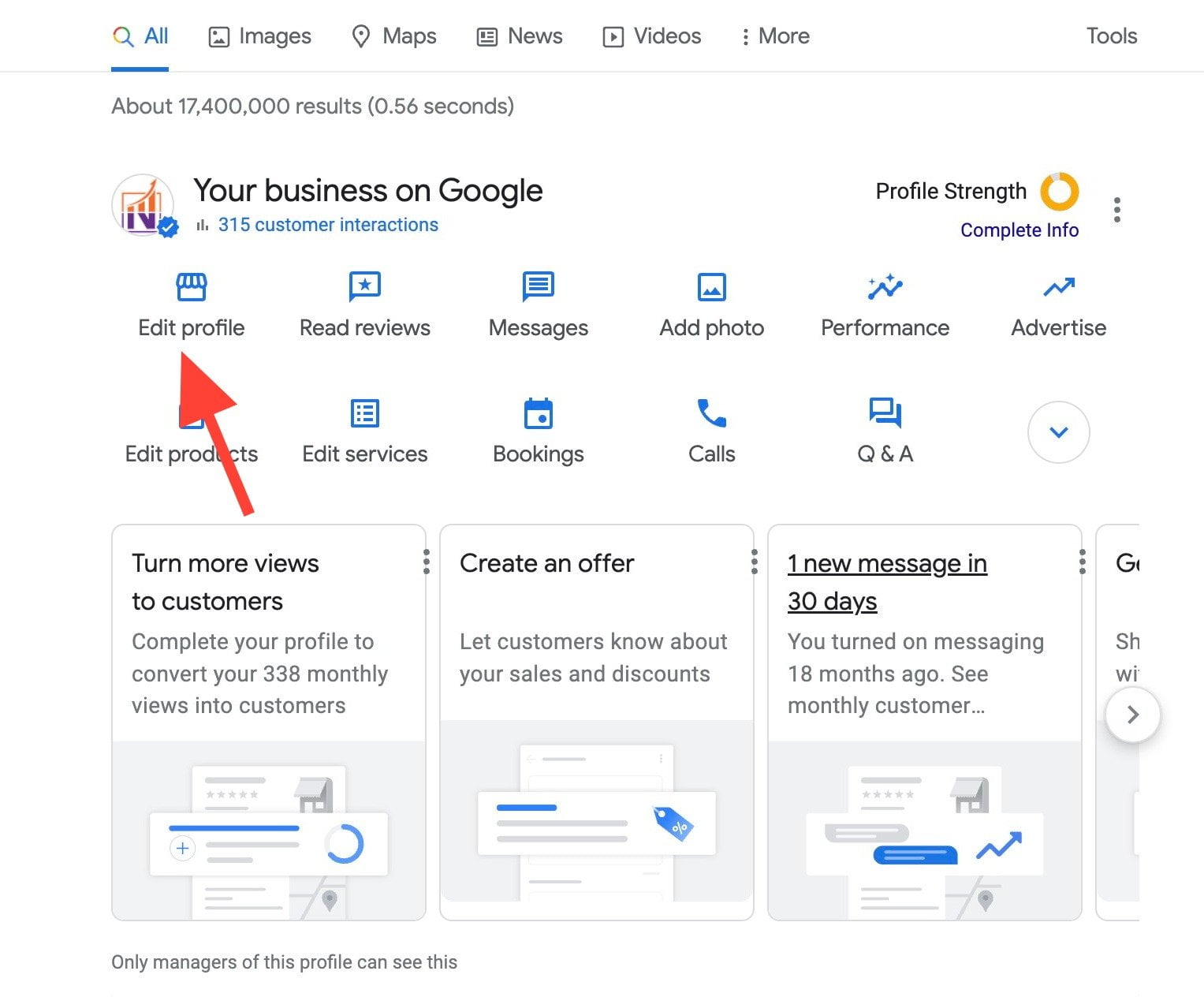
The first step is to go to your Google Business Profile. This can be accessed directly by going to google.com/business and signing into the same account used to create the business listing. Once logged in, switch from a personal profile to your business manager menu. Here you’ll see any businesses associated with the account. Select the business you want to remove, and click the Menu icon in the top left of the page. This will take you to the management page for the business.
Step 2: Edit Profile and Business Information
Once you have selected “Your Business Profile” from the menu options, you should then be directed to a page where you can select the piece of information you would like to edit.
For example, if you are trying to update the address for your business you will select the “Info & Hours” tab, and then enter the new address. If you are trying to update the contact information for your business, you will select the “Contact Information” tab and enter the new details. If you are removing your business from Google Maps altogether, you will select the “Delete Business Profile” tab.
When editing your business profile, be sure to take the time to look over your changes. Double-check the spelling and accuracy of the new information and make sure you are satisfied before clicking “Save”. Additionally, once you have entered the new information and selected “Save”, you may need to wait a few days for the update to become visible on Google Maps.
Step 3: Select the Hours Tab
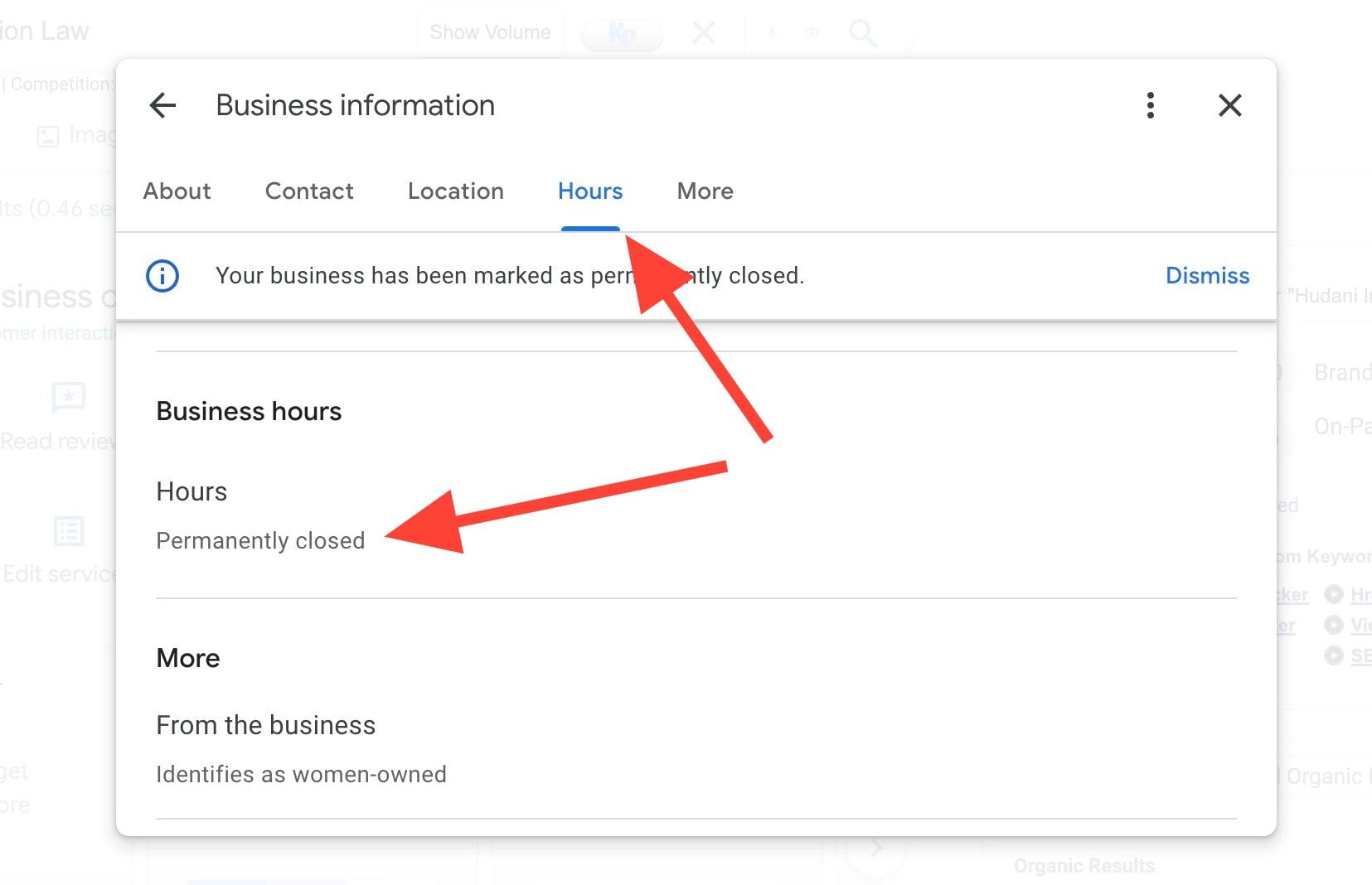
The third step of removing a business from Google Maps is to select the Hours tab at the top of the page. You can find the tab to the left of the Info tab; it should be titled “Hours”. Clicking this tab will open up the hours of operation for the business in question.
Step 4: Select Closed
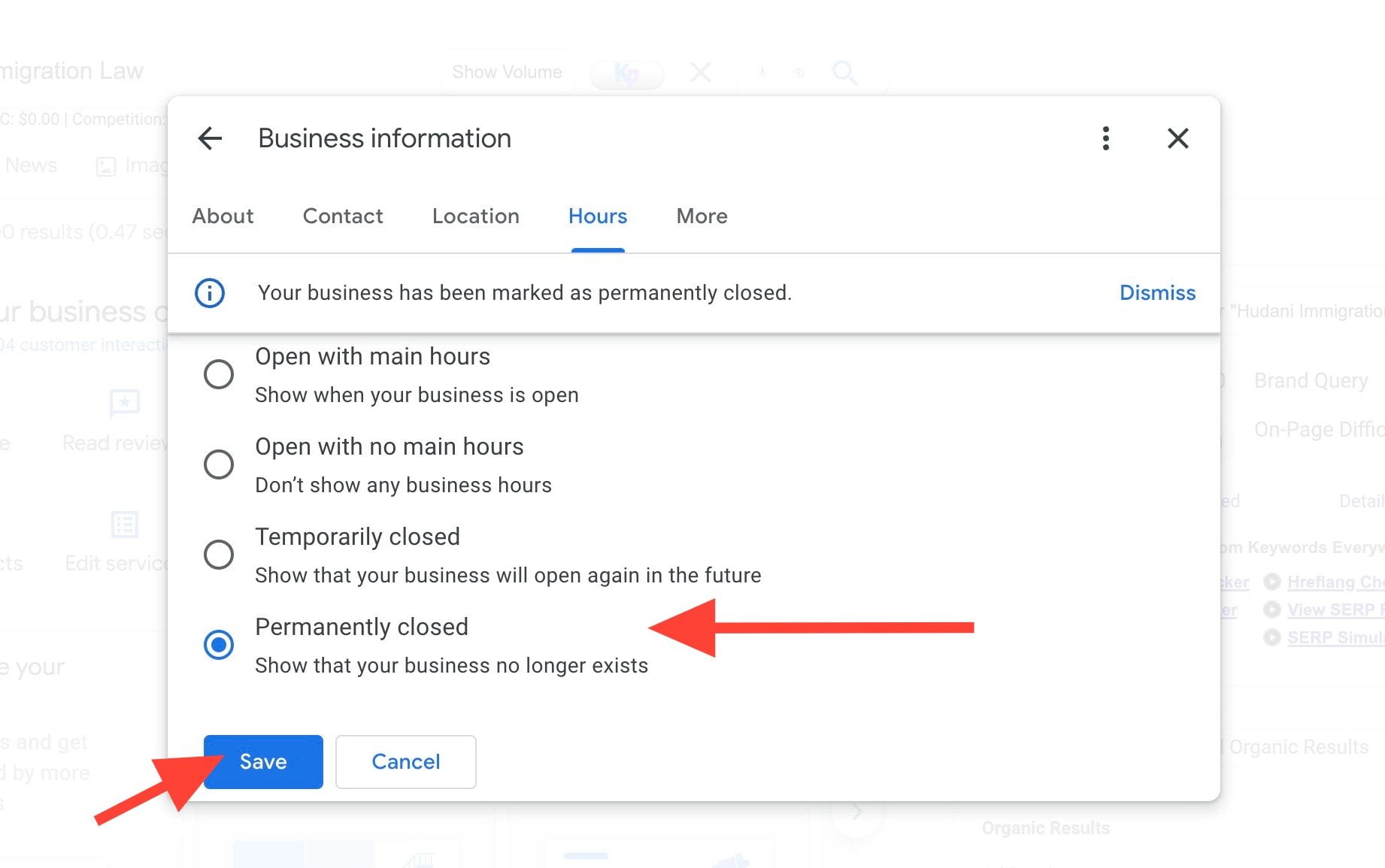
From here, you can choose to add or edit hours, as well as select the checkbox that says “Closed”, which will indicate that the business is closed. You must select the hours if you want to remove the business from Google Maps. Once you do so, the business will no longer appear on the map. If the box is left unchecked, the business may still appear on Google Maps because the system does not have the information about whether or not the business is open.
However, it is important to note that even if the box is left unchecked, the business will still appear on Google Maps search results, but will not appear on the map itself.
Step 5. Select Save
Once you have made all your desired changes, you can then select the option to Save.
Now That You Know How to Remove a Business from Google Maps, What You Should Know
Removing your business from Google Maps is not a process to be taken lightly. Before you remove your business from Google Maps, there are a few points you should consider.
First, understand that Google Maps offers more than just basic business listings. Many online tools and services are connected to Maps such as advertising, Google My Business and more. Removing your business listing from Google Maps will also remove this associated data from the platform.
Second, if anyone has left a review for your business or added photos, those will also be removed when you remove your business listing from Google Maps. You won’t get the chance to save them or transfer them to another platform, so make sure you want to lose them before proceeding.
Third, remember that you may need to complete multiple steps to fully remove your business from Google Maps. This process may require you to contact Google Customer Service, as well as complete technical steps such as updating or deleting information from your account.
Finally, be aware that removing your business listing from Google Maps will make it harder for customers to find your business online. It may take time for search engines to adjust, so customers may still be able to find your business until the changes are complete.
Considering these points can help make sure you’re aware of the implications of removing your business from Google Maps. If you’re still confident that it’s the right decision, you can use the steps mentioned in this blog post to easily remove your business from Google Maps.
Google Business Management and Removal Services
Having troubles understanding how to remove a business from Google Maps? Look no further than Newman Web Solutions Agency. With years of experience in helping customers manage and remove their business listing from Google, our Google experts are the perfect choice for the job. We have a dedicated team of professionals who are experienced in organization and managing Google business listings for our customers.
Our process starts with a thorough review of your business listing on Google. Our team of professionals will assess your current listing to understand why it needs to be removed. After reviewing the listing, we’ll then provide you with a comprehensive plan for removal. This plan consists of steps that must be taken to ensure that your business is removed from Google Maps properly.
In no time, your business will be completely removed from Google Maps. Our team of professionals takes pride in our work and strives to provide the best service possible. So if you’re looking for help with Google Business Profile services, contact Newman Web Solutions and let us take care of the job for you!
Lori Newman
Hello, cyber explorers! I'm Lori Newman, the proud Creative Director and co-founder of Newman Web Solutions, where we don't just build websites; we craft digital experiences that captivate, convert, and conquer! Based in the bustling tech hub of Atlanta, I've spent over a decade in the digital realm, turning pixels into Picasso-esque masterpieces and code into poetry.
Atlanta isn't just the birthplace of Coca-Cola; it's also a burgeoning tech town teeming with potential. At Newman Web Solutions, we're committed to making Atlanta a hotspot for groundbreaking web design and innovative digital strategies.
search engine optimization, local search, google search, marketing, ownership, google account, search engine, digital marketing, icon, mobile app, reputation management, menu, website, web design, google business profiles, business listing, google business listing, local seo, google listings, business address, google business, google business profile, listing google, remove google listing, customer, telephone, sms, experience, management, newsletter, information, brand, computer, tool, internet, knowledge, telephone number, remove google business listing, remove business from google, how do i remove my business from google, how do i delete my business from google, delete google business listing, remove my google business listing, google business delete, how do i remove a business from google, how do you remove your business from google, delete google my business, remove a google business listing, stack overflow, reputation, login, question, data, web browser, analytics, google analytics, google business account, seo agency, remove bad google reviews, remove negative google reviews, get google reviews removed, remove google reviews from business, delete negative google reviews, get rid of bad google reviews, remove fake google reviews, google reviews removed, remove google reviews for business, url, rss, phrase, dashboard, microsoft bing, artificial intelligence, visibility, button, credibility, feedback, can you get google reviews removed, google business account delete, delete my google business, how do i delete my business from google maps, remove my business listing from google, remove your business from google, password, api, share knowledge, engine, terms of service
Frequently Asked Questions
Can I delete my business from Google Maps completely?
Yes, you can delete your business from Google Maps completely by accessing the Google My Business dashboard, selecting the location you want to remove, clicking "Info" and then "Close or Remove this Listing," and confirming the deletion.
How long does it take to remove a business from Google Maps?
The process of removing a business from Google Maps typically takes around 24-48 hours once the request for removal is submitted. However, it can vary depending on Google's review process and the accuracy of the information provided for verification.
Can anyone remove a business from Google Maps?
Yes, any business owner or authorized representative can request to remove a business listing from Google Maps by claiming the listing and following the steps provided by Google's support resources. This typically involves verifying ownership and submitting a request for removal through the Google My Business dashboard.
How do I remove a Google business listing permanently?
To remove a Google business listing permanently, follow these steps:Sign in to Google My Business
Select the listing you want to remove
Click on "Info" in the menu
Scroll down and click on "Remove Listing"
Follow the on-screen instructions to complete the removal process
How do I remove a business from Google Maps permanently?
To remove a business from Google Maps permanently, follow these steps:Sign in to Google My Business.
Select the location you want to remove.
Click "Info" from the menu.
Scroll down and select "Remove this Listing."
Confirm the removal request.
What are the consequences of removing a Google business listing?
Removing a Google business listing can lead to decreased online visibility, loss of potential customers, negative impact on local SEO rankings, and a lack of accurate business information available to customers searching online. It can also result in a loss of credibility and trust among consumers.
Can I remove a business from Google Maps to avoid negative reviews?
Yes, you can remove a business from Google Maps as a last resort to address negative reviews. However, it's advisable to first respond to reviews professionally, resolve issues, and actively manage your online reputation. Only consider removal if all other efforts fail.
Can I remove a business from Google Maps using a mobile app?
Yes, you can remove a business from Google Maps using the Google My Business mobile app. Once logged in, select the location you want to delete, tap the three dots in the top right corner, choose "Remove business," and confirm your decision to remove it from Google Maps.
Can I remove a business from Google Maps if Im not the business owner?
If you are not the business owner, you cannot directly remove a business from Google Maps. You can suggest an edit, report the business as spam, or claim the business if you have ownership rights. Contact Google support for further assistance.
Is it possible to remove a Google business listing completely?
Yes, it is possible to remove a Google business listing completely. The process involves logging into your Google My Business account, selecting the listing you want to delete, clicking on the "Info" tab, scrolling down to the bottom of the page, and selecting "Remove Listing.".unsubscribe from Google's client uninstall services or delete the primary account. It's critical to follow these steps carefully to ensure the listing is deleted permanently and no longer appears in search results.
How do I remove a closed business from Google Maps?
To remove a closed business from Google Maps, follow these steps:Sign in to Google My Business
Select the closed business
Click "Info"
Find “Permanently closed" and click
Click on “Remove Listing"Make sure to verify your actions as they are irreversible.
Can I delete my Google business listing immediately?
To delete your Google business listing immediately, you can log into your Google My Business account, navigate to the location you want to remove, select the "Info" tab, click on "Close or remove this listing," and follow the prompts to delete it permanently.
Can I remove a Google business listing from mobile?
Yes, you can remove a Google business listing from mobile by accessing your Google My Business account, locating the specific listing, and selecting the "Remove listing" option. Follow the on-screen instructions to complete the removal process.
Is there a fee to remove a business from Google Maps?
Yes, there is no fee to remove a business from Google Maps. Businesses can manage their listings through Google My Business and choose to hide or delete their listing if needed, without any cost involved.
How do I remove a business from Google Maps if Im not the owner?
If you are not the owner, you can suggest an edit or provide feedback on the business listing in Google Maps. Go to the business profile, click on "Suggest an edit," and choose the option that best describes your issue. Google will review and potentially remove the business if it violates their policies.
Is removing a Google business listing reversible?
Yes, removing a Google business listing is reversible. You can restore the listing within a limited timeframe after deletion. Access your Google My Business account, locate the removed listing, and follow the prompts to reinstate it. Keep your business information up-to-date for visibility and customer engagement.
What happens when I remove a Google business listing?
When you remove a Google business listing, it will no longer appear in Google search results, Google Maps, or other Google services. This can impact your online visibility, as potential customers may have difficulty finding your business. It is important to consider the implications of removing a listing and to manage your online presence strategically.
Will removing my business from Google affect my online presence?
Removing your business from Google can significantly impact your online presence. It can decrease visibility, disrupt SEO efforts, affect local search rankings, and lead to missed opportunities for customer engagement and growth. Consider alternative strategies when making decisions impacting your online presence.
What are the consequences of removing a business from Google Maps?
Removing a business from Google Maps can result in decreased online visibility, loss of potential customers, lower credibility, and negative impact on local SEO efforts. It can also lead to reduced organic traffic, hindered location-based marketing strategies, and potential difficulty in regaining visibility once removed.
How long does it take to remove a business from Google?
The time it takes to remove a business from Google can vary. Typically, changes to listing details can show immediately, but removal from search results may take anywhere from a few days to a few weeks, depending on Google's processes.
Can I remove a business from Google if its a fake listing?
Yes, you can request to remove a fake business listing from Google by reporting it through the Google Business Profile. Provide evidence of the fraudulent nature of the listing for Google to investigate and potentially take it down.
What are the consequences of removing a business from Google?
Removing a business from Google can result in loss of online visibility, decreased credibility, and potential customer distrust. It may lead to reduced website traffic, negatively impacting sales and revenue. Additionally, not being listed may hinder local SEO efforts, making it harder for potential customers to find the business.
Why would I want to remove my business from Google Maps?
Removing a business from Google Maps may be desired for reasons such as closure, relocation, privacy concerns, or rebranding. Maintaining accurate information and managing online visibility are crucial aspects to consider when making decisions like this.
What happens when I remove a business from Google Maps?
When you remove a business from Google Maps, it will no longer be visible to users searching for businesses in that area on Google Maps. The business information and reviews associated with it will also be deleted from the platform.
How long does it take to remove a Google business listing?
The timeframe to remove a Google Business listing can vary. Typically, it takes about 3-7 days for the change to reflect. However, factors such as technical issues, verification requirements, or Google's processing time can affect the removal duration.
How do I remove an old Google business listing?
To remove an old Google Business listing, follow these steps:Sign in to Google My Business.
Select the location you want to manage.
Click "Info" from the menu.
Scroll down and click on "Remove Listing."
Follow the prompts to complete the removal process.
Can a Google business listing be removed by Google?
Yes, Google can remove a business listing if it violates their guidelines or is reported for inaccuracies or misconduct. Businesses must follow Google's rules to maintain their listings and avoid removal.
What is the process to remove a duplicate business listing?
To remove a duplicate business listing, visit the platform where the duplicate exists, search for the listing, claim ownership if needed, and follow the provided steps to delete or merge the duplicate with the correct listing. Verify the changes for accuracy.
Is it possible to remove a business from Google Maps search?
Yes, it is possible to remove a business from Google Maps search by claiming the business listing on Google My Business and then following the steps to mark it as closed or permanently closed. Additionally, you can request Google to remove a business that doesn't exist or violates their policies.
How do I remove a business from Google Maps if Im the owner?
To remove a business from Google Maps as an owner, follow these steps:Sign in to Google My Business.
Select the location you want to remove.
Click on Info on the menu.
Scroll down and click on "Remove this listing."
Follow the instructions to complete the removal process.
Who can request to remove a business from Google Maps?
A business owner or an authorized representative can request to remove a business from Google Maps by following the appropriate procedures set by Google, which may involve verifying ownership or providing necessary documentation to support the request.
How do I remove a business from Google Maps listing?
To remove a business from Google Maps listing:Sign in to Google My Business.
Select the location you want to remove.
Click "Info" from the menu.
Scroll down and click "Remove Listing."
Follow the prompts to finish removal.
Do I need to verify ownership to remove a Google business listing?
Yes, Google requires ownership verification to remove a business listing. The verification process ensures that only authorized individuals can make changes to a listing, maintaining accuracy and legitimacy in Google's business database. It usually involves confirming ownership through various methods like email or phone verification.
Can I remove a Google business listing without an account?
To remove a Google Business listing without an account, you can request removal through the Google My Business Support Center. Provide the necessary details about the listing, such as the business name, address, and reason for removal to initiate the process effectively.
What steps ensure complete listing removal?
To ensure complete listing removal, follow these steps:Contact the platform directly.
Provide all necessary information.
Request confirmation of removal.
Monitor the platform to verify.
How to override a listings verification?
To override a listing's verification, contact the platform's support, provide relevant evidence, and request a manual review. Maintain accuracy and consistency in your listing information for prompt verification.
Do removal requests require documentation proof?
Yes, removal requests typically require documentation proof to verify the validity of the request and ensure compliance with relevant policies and regulations. Providing the necessary documentation can expedite the removal process and prevent delays or rejection of the request.
Can a business reinstatement cancel removal?
Yes, a business reinstatement can indeed cancel removal if the necessary requirements and procedures are fulfilled within the specified guidelines set by the relevant authorities.
how to delete google my business listing, how to remove a business from google maps, how to delete your business from google, how to delete a google business, how do i remove my business from google, delete my business from google, how to close business on google, how to remove menu from google business, how to delete business on google, google my business remove listing, remove my business from google, how to remove a google business listing, google maps delete business, google business delete, delete google business account, how to delete google places listing, google maps remove business, removing a business from google, how to remove a business from google, remove a google business listing, how to delete my business on google, remove business address from google, manage google maps business, remove photos from google business, remove my business, how to delete google business page, how to remove a google my business listing, delete business on google, how to remove business listing from google, how to delete google my business, how do i remove business names from google maps, delete my business from google maps, remove company from google, removing photos from google business, how to remove your business from google maps, how to delete a business on google, remove business labels from google maps, delete google business listing, how to delete google maps business, how do i remove a business from google, delete google business, can you remove your business from google, remove my google business listing, remove a business from google, remove business on google, how do i remove my business from google maps, gmb profile removal service, how do you remove a business from google, remove listing from google, how to remove business from google, remove your business from google maps, how to remove google business listing, how to delete a business from google, manage google maps, how to remove my business from google maps, how to delete business from google maps, delete business on google maps, how to remove address from google business, google my business remove, remove business listing from google, remove my business from google maps, how to remove listing from google, google maps atlanta, remove business from google maps, how to remove business from google maps, atl google maps, delete google my business, remove my business listing from google, manage business on google maps, removing google business profile, google maps ads remove, remove photo on google business, how to delete google business, how to remove business labels from google maps, remove business from google, how to remove google business, remove google my business, delete google my business listing, remove ads from google maps, remove google my business listing, how to close a google business listing, how to delete business google, how to remove businesses from google maps, remove google business, how to delete your business on google, how to remove my business listing from google, google maps uninstall, delete a business from google, how to remove my business from google, how to remove a business on google, remove business from google account, google business remove listing, remove google maps listing, google my business remove hours, remove business from google my business, delete business from google, how to remove google business page, delete google my business profile, how to delete gmb, how to delete a gmb listing, remove your business from google, remove business from google business, delete a business on google, how to delete a business page on google, how to delete a business from google maps, how to remove your business from google, how to remove a google listing, how to delete my business from google maps, remove business listing from google maps, remove google listing, remove google business profile, remove google business listing, hide business from google maps, google my business delete, how to remove business address from google maps, google business remove, how to remove google listing, how to turn off businesses on google maps, how to delete a google my business listing, delete business listing, how to delete a business on google maps, how to remove business on google maps, remove address from google business, how do i remove my business listing from google, how to remove listing from google business, edit google maps business listing, how to remove customer photos from google business, delete business from google maps, how to close google business listing, how to close a business on google, google maps manage business, how to close google business account, how to remove company from google maps, how do i delete my business from google, deactivate google business account, how do i delete my business from google maps, google remove listing, how to close a google business account, close google business listing, how to delete business from google my business, google remove business listing, remove listing from google my business, how to delete a business in google maps, how can i delete my business from google maps, delete google map business, delete a google business listing, how to delete business on google maps, delete business google, manage google maps listing, how to delete business in google, how to delete my google business listing, how to take down a google business page, how to remove located in from google my business, remove business google maps, how to remove my google business listing, how to delete business from google, how to delete google business listing, how to remove business names from google maps, how do you delete a business on google, how to remove google business account, how to manage google maps business, how to close your business on google, turn off business labels in google maps, how do you remove your business from google, turn off google my business, how to remove yourself from google my business, deleting business from google, close business on google, delete my business on google, can you delete a google business listing, how to remove listing from google maps, can i delete google my business, how to delete a google listing, how to remove google my business listing, how do i remove my google business listing, how to remove a business listing from google, remove company from google maps, can you remove a business from google, take down google business page, how to remove google map business, delete my google business listing, removing photos from google business profile, how to delete google business account, how to delete my business off google, how to remove photo in google business, google my business delete account, delete a google business account, delete my google business, delete a google my business listing, can i remove my google business listing, google business listing removal, how to remove business from google map, how to delete my google business account, delete business account google, how to remove google business site, remove photo from google business, remove a google my business listing, removing business from google, how to remove photos from google business page, manage business google maps, how to close a business on google maps, how to remove my business address from google, remove business from google map, remove google business account, remove user from google business, remove business profile from google, how to delete a google business listing, how to remove a listing from google, how to remove photos on google business, how do you delete a google business account, how to make google maps not show businesses, remove photos from google my business, google remove business profile, how to take my business off google, how do i remove a closed business from google, how to remove business from google business, how to remove a business from google my business, how to delete my google business, google maps remove business labels, can i delete my business from google, how to remove listing from google my business, how to delete business off google, how to remove work from google maps, remove business names from google maps, delete google business page, how can i remove my business from google, how to delete a business on google my business, my business delete, remove business address from google maps, how do i take my business off google, how to delete a google my business account, remove customer photos from google business, how to hide business on google maps, google business account delete, delete google listing, how to delete business listing on google, remove my address from google, remove work from google maps, remove a business from google maps, remove photo google maps, how to remove yourself from google business profile, how do i delete my business on google, how to remove photos from my google business listing, how to remove google my business, delete business page google, delete business from google my business, delete your business from google, how to delete a business from google my business, how to remove google business from maps, google business remove photos, how to delete business account on google, google business delete account, remove business from maps, how to remove a business address from google maps, how do i delete a google business account, how to remove your address from google, remove business, how to delete google listing, how to remove photos from google business, google maps agency, how to remove photos google business, how to delete business on google my business, how to remove closed business from google, remove work google maps, google maps management, how to remove a google maps listing, google maps advertising company, how to delete a business listing on google, google maps atlanta ga, how to remove manager from google business, how to remove google business photos, google business, how to remove business in google maps, how to remove a photo from google business, how to take down google business page, how to delete google my business page, how to get business removed from google maps, google maps manage, how to remove photo from google business, how to deactivate google business account, how to delete my business from google, google maps marietta ga, google my business remove photos, can i remove my business from google, google maps remove review, remove businesses from google maps, how to remove business location from google maps, how to delete business profile on google, how to remove my business address from google maps, remove myself from google business, how to delete google my business account, turn off businesses in google maps, delete a business profile on google, how to remove photos from google my business, google my business remove photo, how to remove a photo from google my business, listing on google maps, can i cancel a google business account, google my business hide address, google delete business profile, how to delete a google business account, how to remove a customer photo from google my business, remove listing from google search, how to remove a post from google, how can i delete my google business account, delete google business profile, google map atlanta, how to remove address from google, how to delete your google business profile, how to remove a google business profile, remove address from google, edit google maps listing, google maps hide businesses, business on google maps, cancel google my business account, how to permanently delete google business account, how to remove photos from google maps business, how to hide address on google my business
Why Remove Your Business from Google Maps?
There are several reasons why you may want to remove your business from Google Maps. For example, if your business is closing down, it's essential to update your online presence to reflect that change. Additionally, if there are inaccuracies in your listing or you no longer want your business to be visible on Google Maps, removing it can help maintain your online reputation.
Benefits of Professional Google Business Management Services
Professional Google Business Management Services can take the stress out of managing and removing your business from Google Maps. They have the expertise and tools to streamline the process, ensuring that your online presence is updated accurately and efficiently. By utilizing these services, you can save time and focus on other aspects of your business while experts handle the technicalities of removing your business from Google Maps.