Frequently Asked Questions
How do breadcrumbs interact with other navigation elements?
Breadcrumbs complement other navigation elements by showing users their current location on a website hierarchy. They enhance user understanding, facilitate easier navigation, improve website usability, and contribute to a better user experience overall. Breadcrumbs work alongside menus, search bars, and links to create a seamless browsing journey.
How do breadcrumbs help in reducing bounce rates?
Breadcrumbs contribute to lowering bounce rates by enhancing website navigation, improving user experience, establishing site structure, increasing user engagement, and providing visitors with clear pathways to additional relevant content. They help users understand their current location on a website, encouraging them to explore further rather than bouncing.
How do I add breadcrumbs to my websites navigation menu?
To add breadcrumbs to your website's navigation menu, you can follow these steps:Use HTML markup to create breadcrumbs.
Style breadcrumbs with CSS for visual hierarchy.
Incorporate dynamic breadcrumb generation for easier maintenance.
Include structured data for search engines to understand the breadcrumb trail.
Can I use breadcrumbs on a mobile website?
Yes, you can use breadcrumbs on a mobile website. It helps users navigate efficiently, aids in website hierarchy understanding, and enhances user experience. Ensure they are responsive, concise, and placed strategically to support mobile usability.
Are breadcrumbs a must-have for a website redesign?
Breadcrumbs are not a necessity for a website redesign, but they can enhance user experience and navigation. They provide context, improve SEO, and aid in understanding site structure. Consider incorporating them for improved usability and SEO benefits.
How do breadcrumbs help with website usability?
Breadcrumbs enhance website usability by providing clear navigation paths, aiding users in understanding their location within a website's hierarchy, improving user experience, boosting SEO by indicating site structure, and reducing bounce rates by offering easy site traversal.
Can breadcrumbs be used in conjunction with a site map?
Yes, breadcrumbs can be used alongside a site map to enhance navigation and provide users with multiple methods to navigate a website effectively. Breadcrumbs offer a linear trail for users to trace back their steps, while a site map provides an overall structure of the website for a comprehensive view. Combining these elements can improve user experience and site usability.
Can breadcrumbs be used for personalization and customization?
Breadcrumbs primarily serve as navigation aids and do not typically provide personalization or customization features on their own. For tailored user experiences, implementing personalized content, recommendations, or user-specific tools are more effective strategies.
What are the future trends and developments in breadcrumb design?
In future developments of breadcrumb design, trends include simplified and minimalist styles, enhanced user interactivity through hover effects, integration with intelligent search features, and increased emphasis on accessibility and responsiveness for mobile devices. Innovations may also include dynamic breadcrumbs reflecting user paths and customization options for user preferences.
Are breadcrumbs supported by all web browsers?
Breadcrumbs are HTML and CSS elements commonly supported across all modern web browsers as they are standard webpage components that enhance navigation and user experience without significant compatibility issues.
How do breadcrumbs help in enhancing website usability?
Breadcrumbs enhance website usability by providing clear navigation paths, showing users their location within the site hierarchy, improving user experience, reducing bounce rates, and aiding in overall website accessibility and SEO efforts.
Can breadcrumbs be customized for a web application?
Yes, breadcrumbs can be customized for a web application by adjusting their design, styling, and functionality to match the application's branding and user experience requirements. Customization can include changing the appearance, position, navigation behavior, and content displayed in the breadcrumbs trail.
How do I optimize breadcrumbs for website search engines?
To optimize breadcrumbs for website search engines, ensure they are structured logically, use relevant keywords, keep them consistent with your site structure, make them clickable for easy navigation, and use schema markup for better visibility in search results.
Can I customize the appearance of breadcrumbs on my website?
Yes, you can customize the appearance of breadcrumbs on your website by adjusting their design, colors, fonts, spacing, and placement through CSS styling. Breadcrumbs are beneficial for navigation and can be tailored to fit your site's aesthetics and user experience needs.
What is the purpose of breadcrumbs in e-commerce?
In e-commerce, breadcrumbs serve to improve website navigation by showing users their current location within the site's hierarchy, aiding in easier backtracking, reducing user confusion, enhancing the user experience, and potentially increasing conversion rates.
What are the different types of breadcrumbs in web navigation?
There are three main types of breadcrumbs in web navigation: location-based, attribute-based, and path-based. Location-based breadcrumbs show the user's current position on the website. Attribute-based breadcrumbs allow users to navigate based on certain attributes. Path-based breadcrumbs display the user's journey through the website hierarchy.
Can I use breadcrumbs for accessibility on my website?
Yes, breadcrumbs are a helpful accessibility feature on websites as they provide clear navigation paths, aiding users in understanding the website structure. They enhance user experience and are particularly beneficial for users with visual or cognitive impairments, allowing easy site orientation and navigation.
How do breadcrumbs impact website loading speed and performance?
Breadcrumbs have minimal impact on website loading speed and performance as they are typically lightweight elements that do not significantly increase page loading times. When implemented correctly using efficient coding practices, breadcrumbs can enhance user experience without compromising speed.
Can breadcrumbs be used on single-page applications?
Breadcrumbs can be used in single-page applications to improve user navigation and provide context within the app. They can enhance user experience by showing the user's path and allowing them to backtrack easily. It's essential to implement dynamic breadcrumbs that reflect the app's structure and user interactions accurately.
Where are breadcrumbs typically located on a webpage?
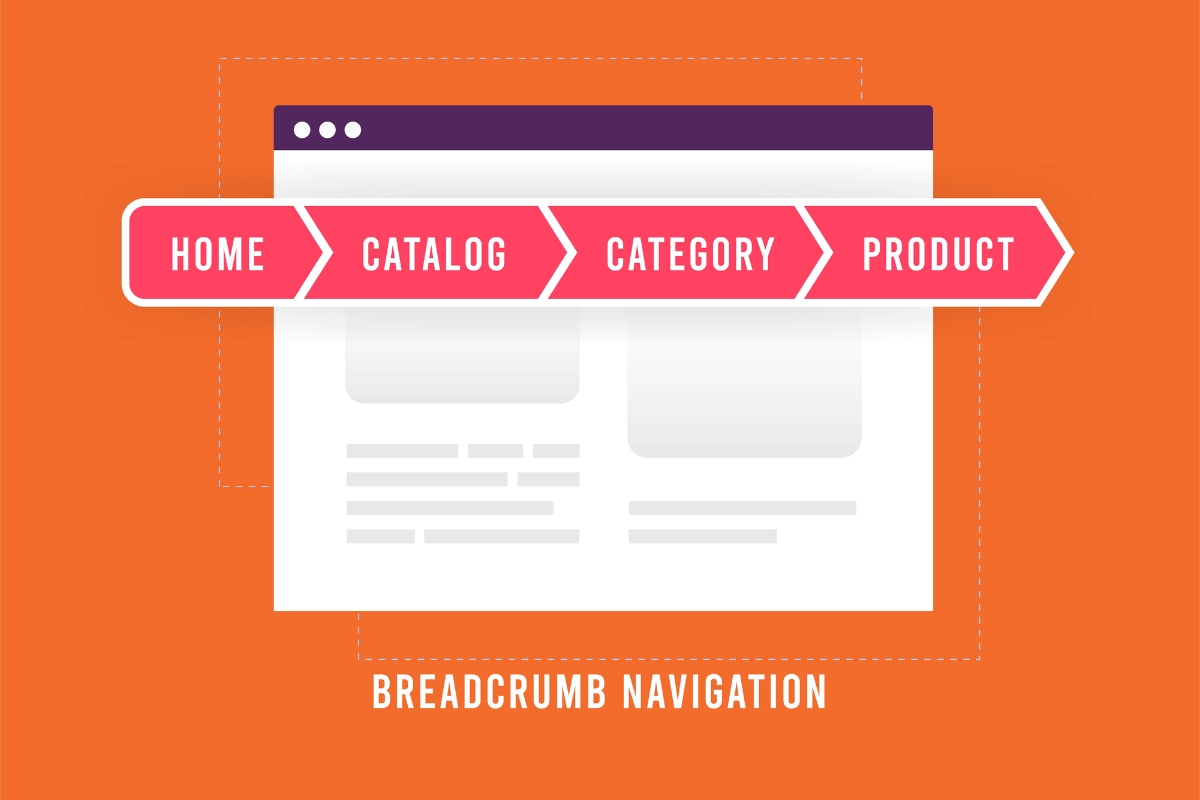
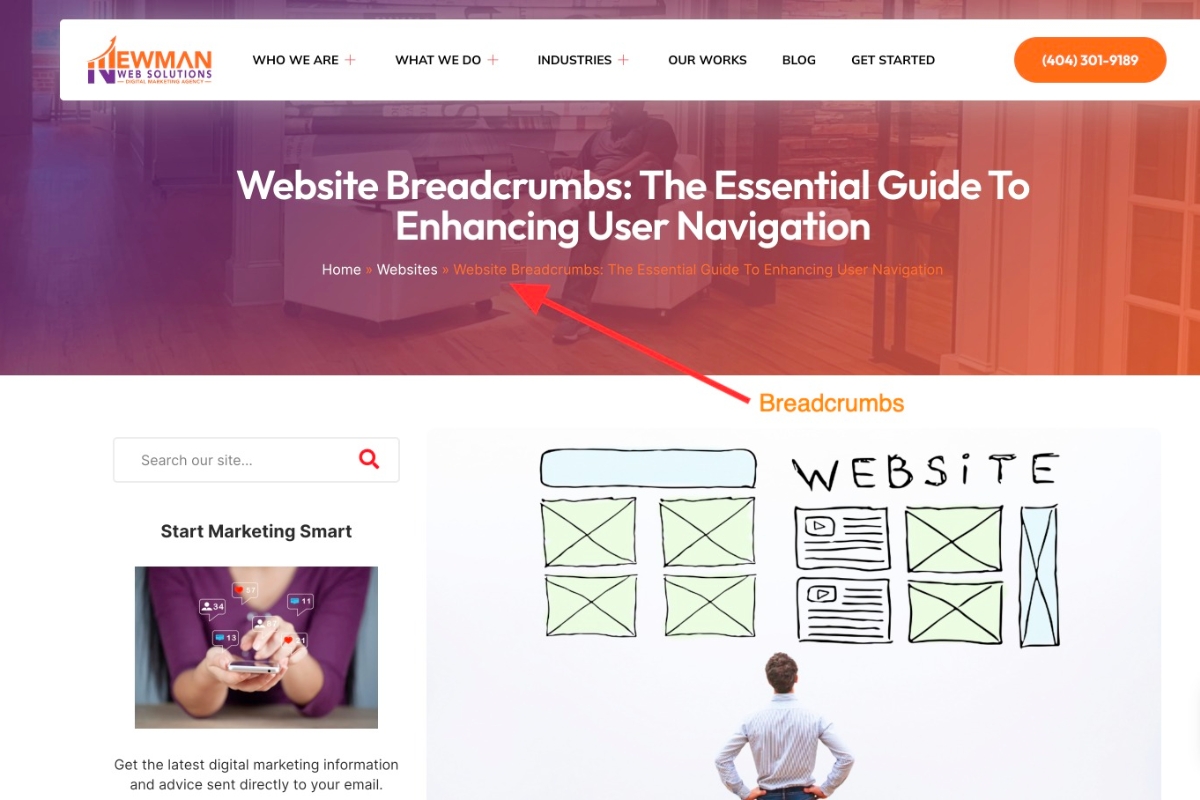
Breadcrumbs are typically located at the top of the webpage, just below the primary navigation menu or underneath the page title. They serve as a navigational aid, showing the user the path they have taken to arrive at the current page.
What are breadcrumbs in web design and development?
Breadcrumbs in web design and development are navigational aids that display the user's current location on a website hierarchy. They enhance user experience, improve website navigation, and help users understand the site's structure. Breadcrumbs are typically displayed horizontally at the top of a webpage, showing the path back to the homepage or previous pages. They can help users backtrack, explore related content, and improve website accessibility and SEO.
What are the best practices for breadcrumb design?
When designing breadcrumbs, keep them horizontal, concise, and visually distinct. Use a clear hierarchy, show the user's path, link each step, and style them subtly for easy navigation. Ensure responsiveness and align with the website's structure and user journey.
How do I track breadcrumb clicks on my website analytics?
Tracking breadcrumb clicks on your website analytics involves setting up event tracking through tools like Google Analytics. Implement structured data markup for breadcrumbs on your website, then configure event tracking to monitor user interactions with the breadcrumb navigation. This enables you to analyze user behavior and optimize the breadcrumb trail for better navigation and user experience.
How do breadcrumbs enhance user navigation experience?
Breadcrumbs enhance user navigation experience by providing clear paths, improving site structure understanding, reducing clicks, aiding in backtracking, and enhancing SEO through keyword-rich links. They help users easily track their location on the site and find relevant information efficiently.
Can breadcrumbs be used in single-page applications?
Yes, breadcrumbs can be used in single-page applications to provide users with navigational aid, indicating their current location within the app's structure. By updating dynamically, breadcrumbs help users track their journey and enhance overall user experience and navigation within the single-page application.
How do breadcrumbs help in website analytics and tracking?
Breadcrumbs in website analytics provide a clear navigation trail for users, reducing bounce rates, improving user experience, and aiding in understanding user behavior. They help track the user's journey, identify popular paths, and optimize website structure for enhanced engagement and conversion rates.
Can breadcrumbs be used for A/B testing and experimentation?
Breadcrumbs generally are not suitable for A/B testing and experimentation as they primarily serve as navigation aids for website users. A/B testing involves testing variations of content or design to measure user behavior and preferences, which is not directly tied to the functionality of breadcrumbs. For testing and experimentation purposes, it's recommended to focus on elements like call-to-action buttons, headlines, images, or layout adjustments for more impactful results.
How do I add breadcrumbs to my websites footer?
To add breadcrumbs to your website's footer:
1. Create a breadcrumb navigation HTML structure.
2. Style the breadcrumbs with CSS to match your footer design.
3. Add the breadcrumb code to your footer template file within the appropriate HTML tags.
4. Test to ensure they display correctly and function as intended.
How do breadcrumbs affect search engine optimization?
Breadcrumbs improve SEO by enhancing site navigation, user experience, and keyword relevance. They enable search engines to understand site structure, improving indexing and ranking. Properly implemented breadcrumbs can increase user engagement and time-on-site metrics, contributing to overall SEO success.
How do I create dynamic breadcrumbs for my website?
To create dynamic breadcrumbs for your website, you can utilize HTML and CSS for structure and styling, while incorporating JavaScript or server-side scripts to generate the dynamic links based on the current page hierarchy or navigation path. Implementing a function that dynamically generates and updates the breadcrumb trail based on the user's interaction with the site is key to ensuring a seamless and informative browsing experience.
What are the benefits of using breadcrumbs on a website?
Using breadcrumbs on a website enhances user experience by improving navigation, reducing bounce rates, increasing time spent on site, and facilitating a clear site structure. Breadcrumbs boost SEO by providing search engines with context and internal linking opportunities, ultimately enhancing overall website usability and performance.
Are breadcrumbs necessary for an e-commerce website?
Breadcrumbs are beneficial for e-commerce websites as they enhance user experience, improve SEO, and aid in navigation. They provide clear site structure, assist in understanding website hierarchy, and boost overall usability by helping users backtrack or jump to higher-level categories easily.
How do I make breadcrumbs responsive on my website?
To make breadcrumbs responsive on your website, you can:
1. Use CSS media queries to adjust the breadcrumb size based on the screen width.
2. Consider using Flexbox or Grid layout for better responsiveness.
3. Increase the font size and padding for smaller screens to improve readability on mobile devices.
What are the alternatives to using breadcrumbs in web navigation?
When breadcrumbs are not used in web navigation, alternatives include clear and descriptive menu labels, a search bar for direct access, contextual navigation within content, visual hierarchy through headings, "Back to top" buttons for lengthy pages, and well-organized sitemaps or site structures.
How do breadcrumbs impact website loading times?
Breadcrumbs typically have a minimal impact on website loading times as they are simple text links. They are lightweight elements that do not significantly affect page speed. However, ensure proper implementation to avoid any negative impact on user experience or loading performance.
Can breadcrumbs be used on mobile responsive websites?
Yes, breadcrumbs can be effectively utilized on mobile responsive websites to improve navigation and user experience. They provide clear pathways for users, aid in orientation within the site, and enhance overall usability on smaller screens. Integrating responsive design principles ensures breadcrumbs enhance, rather than hinder, mobile user interactions.
Do breadcrumbs improve website user experience and engagement?
Yes, breadcrumbs enhance website user experience by providing clear navigation and improving visitor engagement. They help users understand their location on the site, find their way back easily, and increase overall site usability.
Do breadcrumbs have any accessibility benefits?
Breadcrumbs are beneficial for website accessibility as they provide clear navigation paths for users, especially those with disabilities. They offer orientation, aid in understanding website structure, and enable easier navigation, enhancing the overall user experience and accessibility of a website.
Can I use breadcrumbs for multiple languages on my website?
Using breadcrumbs for multiple languages on your website is possible and beneficial for navigation. Utilize structured data markup for each language, maintain consistent hierarchical structure, and consider user experience for seamless multilingual breadcrumb implementation.
What are the challenges of implementing breadcrumbs on complex websites?
Implementing breadcrumbs on complex websites can pose challenges like navigation consistency, scalability issues, and breadcrumb visibility across various devices. Additionally, ensuring correct hierarchy representation, dynamic content handling, and mobile responsiveness are crucial considerations for effective breadcrumb implementation in such environments.
Can I use breadcrumbs on a one-page website?
Yes, you can use breadcrumbs on a one-page website to enhance user navigation and provide a clear path for visitors to understand their current location on the page. Breadcrumbs are beneficial for user experience and can help with website usability even on single-page sites.
How do breadcrumbs help with website information architecture?
Breadcrumbs enhance website information architecture by showing users their navigation path, aiding in orientation, improving user experience, and increasing findability of content. They provide a clear trail back and make site structure more intuitive, benefiting both users and search engines.
Are breadcrumbs a required feature for web accessibility?
Breadcrumbs are not a mandatory feature for web accessibility, but they can greatly enhance user experience by providing clear navigation paths. When implemented properly, breadcrumbs can improve website usability and help users understand the structure of the site.
How do breadcrumbs affect website accessibility?
Breadcrumbs improve website accessibility by providing clear navigation paths, aiding users in understanding site structure, enabling easier backtracking, and enhancing overall user experience for individuals with disabilities or those using assistive technologies like screen readers.
Can breadcrumbs be used with infinite scrolling?
While breadcrumbs are typically used with traditional pagination, they can be adapted for infinite scrolling by updating the trail dynamically as users scroll. Implementing them in a way that maintains accuracy and relevance in the browsing context will enhance user experience and navigation efficiency.
Are breadcrumbs available on mobile devices?
Yes, breadcrumbs are available on mobile devices. They enhance navigation, improve user experience, and help users understand their current location within a website. Additionally, breadcrumbs optimize mobile-friendly websites by providing easy access to previous pages or categories, streamlining the browsing experience.
Do breadcrumbs support right-to-left languages?
When implementing breadcrumbs for websites in right-to-left languages such as Arabic or Hebrew, ensure the CSS and HTML are adjusted accordingly to display correctly. Breadcrumbs can be supported in right-to-left languages by changing alignment properties and using language-specific characters when necessary.
What type of website can benefit from using breadcrumbs?
A website with complex navigation structures, multiple hierarchical levels, and diverse content can benefit from using breadcrumbs. Websites focusing on e-commerce, news, blogs, forums, and directories often find breadcrumbs helpful for enhancing user navigation and improving overall user experience.
Can breadcrumbs be used for SEO optimization?
Yes, breadcrumbs are beneficial for SEO optimization as they improve website navigation, user experience, and search engine crawling. They provide internal linking, enhance site structure, and help search engines understand the hierarchy of a website's content, ultimately boosting SEO performance.
Can I use breadcrumbs on a website with a complex layout?
Yes, you can use breadcrumbs on a website with a complex layout to enhance navigation and improve user experience. Breadcrumbs help users understand their current location within the site hierarchy, making it easier for them to backtrack or navigate to higher-level pages effortlessly.
What is the history of breadcrumbs in web design?
Breadcrumbs in web design originated in the early 2000s to improve site navigation by showing a user's location within a website hierarchy. They mimic Hansel and Gretel's breadcrumb trail from the fairytale, aiding user orientation and enhancing user experience.
How do breadcrumbs help with website search engine optimization?
Breadcrumbs help with website SEO by improving user experience, enhancing site navigation, and providing internal linking. They enable search engines to understand website structure better, leading to better indexation and potentially higher rankings. Breadcrumbs also help with reducing bounce rates and increasing the time users spend on the site, which are essential SEO factors.
Do breadcrumbs slow down my websites loading speed?
Using breadcrumbs on your website typically does not significantly slow down loading speed. It is considered a lightweight feature and can actually improve user experience by enhancing navigation. However, ensure efficient implementation to minimize any potential impact on loading times.
What are the benefits of using breadcrumbs on e-commerce websites?
Using breadcrumbs on e-commerce websites enhances user navigation, improves SEO, reduces bounce rates, and increases website usability. Breadcrumbs provide clear hierarchical paths, aid in finding products, and enhance user experience with easy backtracking.
What is the difference between breadcrumbs and navigation menu?
Breadcrumbs display a user's path through a website, showing the hierarchy, while navigation menus provide links to different sections or pages. Breadcrumbs focus on the user's current location, while navigation menus offer broader site exploration options.
How do breadcrumbs improve user experience on websites?
Breadcrumbs enhance website UX by providing clear navigation paths, aiding user orientation, reducing clicks, improving search engine visibility, and enhancing overall user experience, especially on sites with complex structures or deep content hierarchies. They offer quick access to previous pages and help users understand a site's structure better.
What are the different types of breadcrumbs used on websites?
There are three main types of breadcrumbs used on websites: Location-based breadcrumbs, Path-based breadcrumbs, and Attribute-based breadcrumbs. Location-based breadcrumbs show where the user is on the website hierarchy, Path-based breadcrumbs display the path taken to arrive at the current page, and Attribute-based breadcrumbs showcase categories or filters applied to the current page.
How should breadcrumbs be structured semantically?
Breadcrumbs should be structured using tags for accessibility. Use schema markup to enhance search results. Ensure each breadcrumb link is descriptive and reflects the site hierarchy. Implement structured data to help search engines understand the website's structure.
What considerations apply to breadcrumb labels?
When defining breadcrumb labels, it's critical to keep them concise, relevant, and reflective of the page hierarchy. Ensure labels match the page content, maintain consistency for user navigation ease, and use structured data for search engine optimization benefits.
Will breadcrumbs display in mobile views?
Yes, breadcrumbs can display in mobile views to enhance user navigation and improve the overall user experience on websites. Utilize responsive design techniques to ensure breadcrumbs adapt well to different screen sizes. Consider the placement and style for mobile optimization.
Do breadcrumbs enhance content discoverability?
Breadcrumbs improve content discoverability by providing navigation pathways for users and search engines, enhancing overall user experience, reducing bounce rates, and signaling hierarchy and relevance of the content. They also contribute to SEO efforts through better indexing and linking signals.
How can breadcrumbs simplify complex navigation?
Breadcrumbs simplify complex navigation by providing users with clear paths to track their location on a website, aiding in orientation and enhancing user experience. They offer a hierarchical structure, enabling users to easily backtrack, reducing confusion and ensuring smooth navigation.
Should breadcrumbs reflect the site hierarchy?
Breadcrumbs should ideally reflect the site hierarchy as they help users navigate easily, understand their current location, and improve SEO. They offer a clear trail back to higher-level pages, enhancing user experience and site structure.
Are breadcrumb trails influenced by SEO?
Breadcrumb trails are beneficial for SEO as they improve site navigation, enhance user experience, and provide search engines with more context. Including relevant keywords in breadcrumbs can positively impact SEO by reinforcing the site structure and helping search engines understand the website's hierarchy.
Are breadcrumbs beneficial to user orientation?
Yes, breadcrumbs are beneficial for user orientation as they provide clear navigation paths, improve user experience, and help users understand their location within a website. Breadcrumbs enhance website usability by reducing confusion and enabling users to backtrack easily.
How can breadcrumbs reduce cognitive load?
Breadcrumbs reduce cognitive load by providing clear navigation paths, indicating the user's location within a website, enabling easy backtracking, and simplifying the overall browsing experience. They enhance usability, aiding users in orientation and improving website accessibility, particularly for complex or multi-level websites.
Do breadcrumbs aid in navigation consistency?
Breadcrumbs improve website navigation consistency by enhancing user orientation, providing clear paths back to previous pages, and improving overall user experience. They help users understand their current location within a website and easily backtrack through the site hierarchy.
Should breadcrumbs be clickable or static?
Breadcrumbs should be clickable, allowing users to navigate quickly. Static breadcrumbs hinder usability and may frustrate users. Clickable breadcrumbs provide seamless navigation and user experience, enhancing overall site usability and visitor satisfaction.
How do breadcrumbs facilitate backward navigation?
Breadcrumbs enhance backward navigation by displaying the hierarchical structure of a website, allowing users to trace their path back easily. They offer a clear trail of previously visited pages, aiding in orientation, improving usability, and reducing the steps needed to backtrack.
Are breadcrumb paths necessary for directories?
Breadcrumb paths are crucial for user navigation, indicating the hierarchical structure of directories and aiding in website usability. They enhance user experience, improve SEO by providing internal linking, and support accessibility for users to backtrack easily. They are especially beneficial for large websites with multiple levels of content organization.
Is breadcrumb visibility important for UX?
Breadcrumb visibility is crucial for UX as clear paths help users navigate sites easily. They enhance user experience by providing context, aiding in orientation, and reducing cognitive load. Additionally, visible breadcrumbs improve findability, increase user confidence, and encourage exploration of website content.
What impacts do breadcrumbs have on SEO?
Breadcrumbs enhance SEO by improving site navigation, user experience, and keyword optimization. They provide internal linking, help search engines understand site structure, and increase the likelihood of site links being displayed in search results, boosting click-through rates.
Can breadcrumbs prevent user disorientation?
Breadcrumbs are a valuable navigational aid that helps users track their path on a website and understand their location within the site's hierarchy. By providing clear and clickable links, breadcrumbs can indeed reduce user disorientation, improve navigation, and enhance the overall user experience.
Do breadcrumbs align with modern UX principles?
Breadcrumbs align with modern UX principles by enhancing navigation, providing clear paths, improving user experience, and aiding in orientation. They contribute to website usability, help users backtrack easily, and reduce cognitive load, fostering a positive user journey.
Are icon-based breadcrumbs user-friendly?
Icon-based breadcrumbs can enhance user experience by providing visual cues for navigation. They are user-friendly when used intuitively, with clear icons representing each step. However, readability and comprehension should be prioritized to ensure effectiveness. Testing with the target audience can validate their usability.
Can breadcrumbs supplement dropdown menus?
Yes, breadcrumbs can complement dropdown menus by providing clear navigation paths and aiding in user orientation. They offer quick access to previous pages and help users understand their location within the website hierarchy. This combination can enhance overall user experience and improve website usability.
Do breadcrumbs support hierarchical site structures?
Yes, breadcrumbs support hierarchical site structures by providing navigation paths. They enhance user experience, improve site structure, and help search engines understand the website hierarchy. Breadcrumbs display the user's location within the site, aiding navigation and promoting a better understanding of the website's organization.
How to design breadcrumbs for clarity?
When designing breadcrumbs for clarity, ensure they are hierarchical, visually distinct, and allow easy navigation. Use intuitive labels, maintain consistency across pages, and consider mobile responsiveness for a seamless user experience. Test them to ensure functionality and understand user behavior for effective refinement.
Are detailed breadcrumbs better for users?
Detailed breadcrumbs provide clear navigation paths for users, aiding in easier site traversal, enhancing user experience, and improving SEO through reinforcing site structure. They contribute to improved user engagement, especially in complex websites with multiple levels or categories.
Do breadcrumbs correlate with lower exit rates?
Breadcrumbs can help reduce exit rates by providing clear navigation, improving user experience, and increasing engagement. They offer visitors a way to track their path through a site, enhancing findability and reducing frustration, thus potentially contributing to lower exit rates.
Should breadcrumbs mirror the page title?
In general, it is beneficial for breadcrumbs to reflect the page title. Consistent breadcrumb titles enhance navigation and improve user understanding of the website structure. However, consider context and user experience to decide if mirroring the page title is the best choice.
Can breadcrumbs indicate a users journey?
Yes, breadcrumbs can indicate a user's journey on a website by showing the path they have taken from the homepage to the current page. They enhance navigation, provide context, and improve user experience by visually displaying the hierarchical structure.
Are visual cues important in breadcrumbs?
Visual cues are crucial in breadcrumbs as they enhance user experience, aid navigation, and provide context within a website. Consistent use of icons, arrows, or separators helps users understand their location and easily backtrack through the site, improving overall usability.
Do breadcrumbs need to reflect taxonomy?
Breadcrumbs do not necessarily need to reflect taxonomy exactly, but they should provide clear navigation paths for users, containing relevant keywords. It's more important that breadcrumbs enhance user experience and help visitors understand their location within the website.